
Video helps you sell. Getting one used to be hard work.
A shoot has to be planned, paid for and signed off. And many AI videos show your product differently from how it really is: labels warp, shapes change. For a listing where every detail has to be right, that does not work.
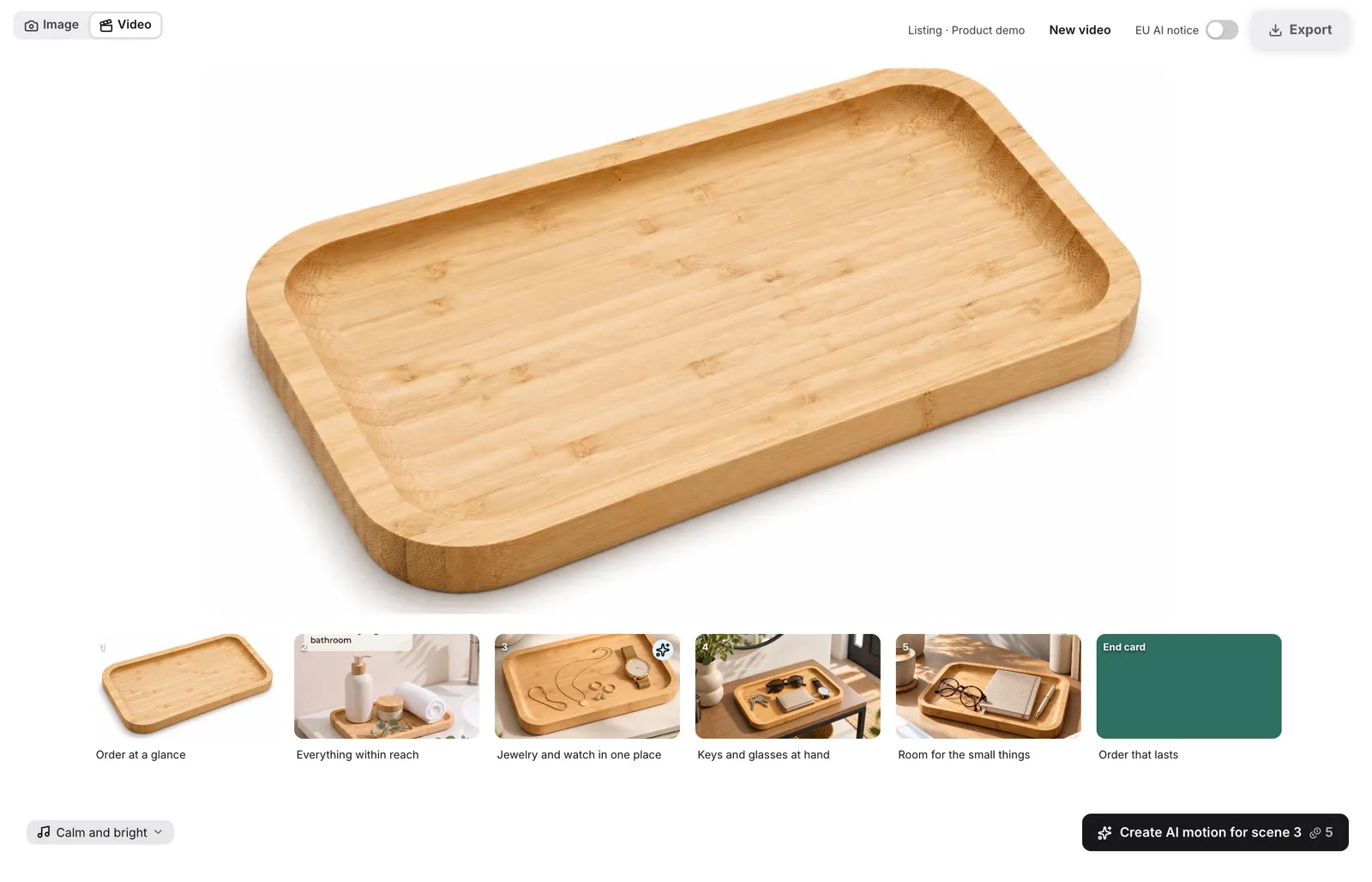
With SellerVisuals you plan your video yourself, from the photos you already have. You see every scene first and decide what goes into the film.
A video for every place your buyers decide
16:9 · 5 scenes · about 20 seconds
Amazon listing
Explains use, proof and result to buyers who are already on your listing. Your product is visible in the first two seconds.
16:9 · 4 scenes · about 15 seconds
Sponsored Brands
Plays muted on a loop in search results. Your product is big from the start, the text carries the message, and the corner with Amazon's controls stays clear.
9:16 · 4 scenes · about 15 seconds
Social media
For Reels, TikTok and Stories: everyday settings, fast first seconds, text placed between the platform's controls.
Three steps to your video
Add your product
Product link, ASIN or photos. Title, features and images come from your listing.
Review the storyboard
You choose the destination and type, SellerVisuals plans the scenes. Change text, order or what a scene shows, or just ask in the chat.
Download your video
As an MP4 in the format's resolution, with AI labelling in the metadata.
What keeps your product accurate in the video
- Real photos as the base. Every scene starts as a still made from your product photos.
- Calm camera. In most scenes the camera moves across the still. Your product stays exactly as it is.
- AI motion where it helps. Real motion appears in at most two scenes and never in the first, so text and labels stay readable.
- Text in your brand font. SellerVisuals sets the on-screen text and end card, not the video AI.
- Amazon specs in view. A traffic light checks length, black frames at the start and end, and letterboxing before you upload.
What story should your video tell?
The type sets the scene flow, look, text and camera. If you are unsure, SellerVisuals picks one to suit your product.
Explain
- Product demo
- How-to
- Unboxing
- Feature highlight
Convince
- Problem → solution
- Before/after
- 3 reasons
- Without vs. with
Social style
- UGC look, handheld
- Satisfying
- Lifestyle reel
The video only shows what is in your product details. No prices, no stars, no invented customer voices.
You pay with the same credits as for images
- Planning the storyboard: free
- Each scene image: 1 credit
- AI motion in a scene: 5 credits up to 5 seconds, 8 credits for longer clips
- Camera moves, text and reordering: free
If a clip fails for technical reasons, your credits come back automatically.

Who's behind it
Built on six years of Amazon agency work
For six years, Simon Gmerek built image sets for Amazon listings with his Cologne agency, from small FBA sellers to established brands.
- 2019Agency for Amazon product images founded
- €2,000+for one image set at the agency
- 1,000+client projects supported
That experience from real Amazon listings is built into our software.
About SellerVisualsFAQ
Do I need an account?
To plan and create, yes, a free one. Guests can look at the video view.
Which photos do I need?
The photos you have of your product, or the link to your listing. They become the scene images.
How long is the video?
About 20 seconds for the listing, about 15 seconds for Sponsored Brands and social media.
Does the video meet Amazon's specs?
The traffic light checks length, black frames at the start and end, and letterboxing. It warns you; the decision stays with you.
Is there a voiceover?
Not at the moment. The on-screen text carries the message, and Amazon plays videos muted anyway.
Can I change scenes?
Yes. Drag to reorder, edit text, adjust the camera move or what a scene shows. If a scene then shows something new, it needs a new scene image (1 credit).
What if a clip does not work?
If it fails for technical reasons, your credits come back automatically. If you do not like a finished clip, keep the free camera move or create it again.
Is the video labelled as AI?
Always in the metadata. You can add the visible EU notice; it is preselected for hands or people and an EU target market.
Are there AI people recommending my product?
No. Invented customer voices are banned in the EU and the US, so we do not offer them.
Creating an Amazon product video: what matters
A product video runs in two places: on your listing, where buyers have already found your product, and as a Sponsored Brands ad in search results. There it plays muted on a loop.
Because many people only glance, your product belongs in the first two seconds. On the listing the video then explains use, proof and result; in the ad it shows the product big from the start.
Without sound, the on-screen text carries the message. SellerVisuals sets it in your brand font and keeps it clear of the areas where platforms show their controls.
AI motion stays sparing: at most two scenes, never the first. Video AIs warp text and labels, so in the other scenes a calm camera moves across the checked still.
What would your product look like in a video?
Plan your storyboard for free and see every scene before you spend credits.